

Here’s a short coding exercise for non-programmers. Could Claude or Codex do it? Absolutely. But I’m going to ask you to do it by hand, like it’s 2021 again. It’ll be good for your brain.
We’re going to draw this with code:
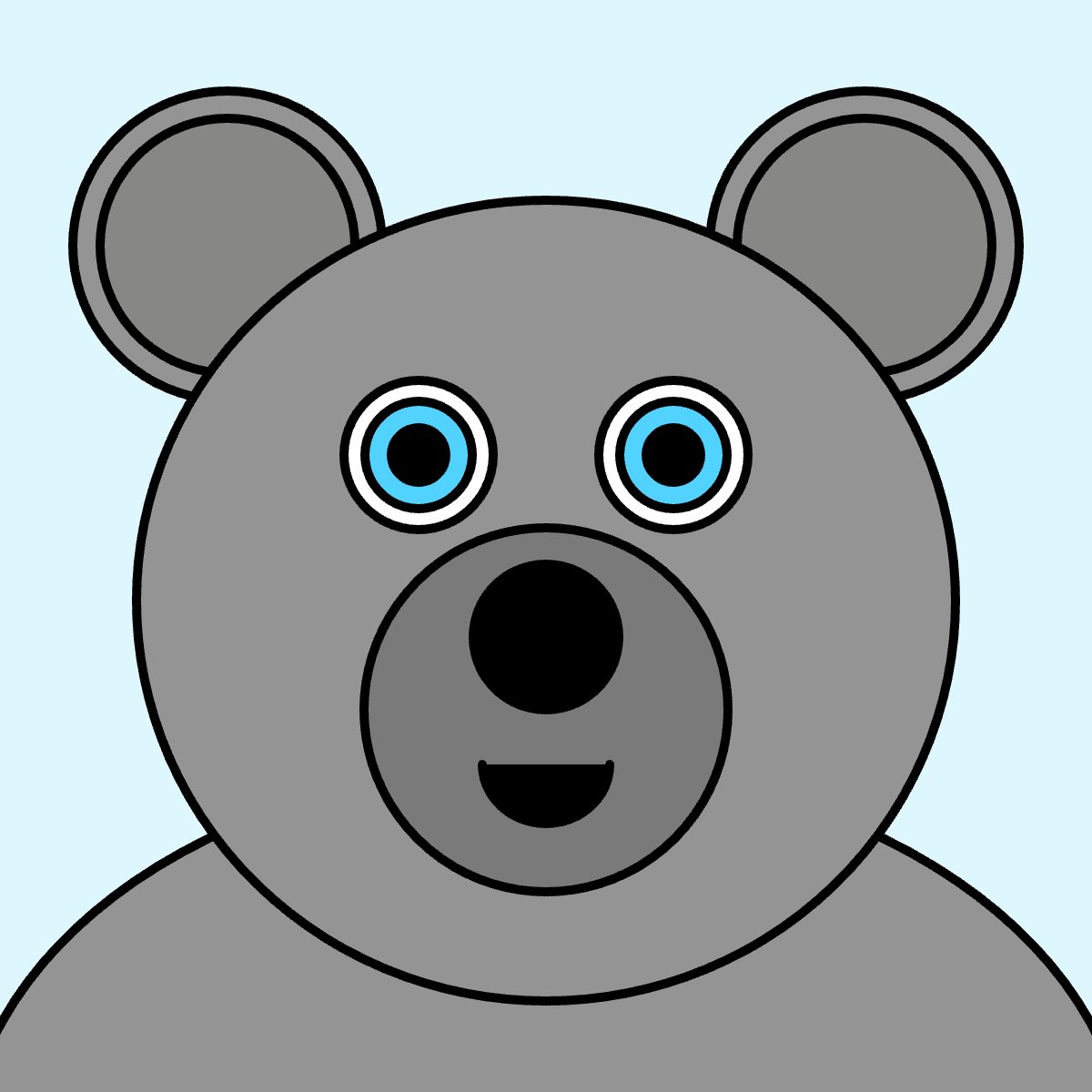
There’ll be some high school math involved. We’ll be able to create variations, as if we were going to mint 10,000 NFTs (remember those?) and become rich overnight.
To get started, go to p5.js and click Start Coding.
You’ll see this:
function setup() {
  createCanvas(400, 400);
}

function draw() {
  background(220);
}
Great, we’re in business.
Let’s make the canvas 600x600, change the background, set the stroke weight, and create an ellipse for the body that’s almost hidden. Type it by hand instead of copy-pasting.
function setup() {
  createCanvas(600, 600);
}

function draw() {
  background('#DEF6FE');

  strokeWeight(5);

  fill('#949494');
  ellipse(300, 640, 640, 440);
}
Hit play to see the results. Each statement ends with a semicolon, but it’ll still work if you forget to add it.
Whenever we write text, we need quotation marks. When we write numbers, we don’t. ‘#949494’ is considered text (it’s a hex code for a color), 600 is a number.
The four numbers in the ellipse function mean, respectively: x for center, y for center, width and height. We start counting y from the top. The canvas is 600x600, so the center of our ellipse is below the canvas.
Let’s draw the ears. I’m going to add some comments, which is text that starts with ‘//’ and is ignored by the interpreter.
function setup() {
  createCanvas(600, 600);
}

function draw() {
  background('#DEF6FE');

  strokeWeight(5);

  // Body
  fill('#949494');
  ellipse(300, 640, 640, 440);

  // Ears
  fill('#949494');
  ellipse(125, 135, 170, 170);
  ellipse(475, 135, 170, 170);

  // Inner ears
  fill('#878786');
  ellipse(125, 135, 140, 140);
  ellipse(475, 135, 140, 140);
}
If width and height are the same, the ellipse is really a circle. Now face, eyes and snout, which are also circles.
function setup() {
  createCanvas(600, 600);
}

function draw() {
  background('#DEF6FE');

  strokeWeight(5);

  // Body
  fill('#949494');
  ellipse(300, 640, 640, 440);

  // Ears
  fill('#949494');
  ellipse(125, 135, 170, 170);
  ellipse(475, 135, 170, 170);

  // Inner ears
  fill('#878786');
  ellipse(125, 135, 140, 140);
  ellipse(475, 135, 140, 140);

  // Face
  fill('#949494');
  ellipse(300, 330, 450, 440);

  // Eyes
  fill('#FFFFFF');
  ellipse(230, 250, 82, 82);
  ellipse(370, 250, 82, 82);

  // Iris
  fill('#52D2FE');
  ellipse(230, 250, 59, 59);
  ellipse(370, 250, 59, 59);

  // Pupils
  fill('#000000');
  ellipse(230, 250, 30, 30);
  ellipse(370, 250, 30, 30);

  // Snout
  fill('#7A7A7A');
  ellipse(300, 390, 200, 200);
}
For the mouth, we’ll need the arc function, which takes the same params as the ellipse function, plus two more: where we start drawing, and where we stop, in radians. We start at 0 and end at π, which is halfway.
In p5.js, angle 0 points right (3 o’clock) and angles go clockwise because y counts downward, so going from 0 to π draws the bottom half, which gives us a mouth.
We’ll also add the nose, which is just a circle.
function setup() {
  createCanvas(600, 600);
}

function draw() {
  background('#DEF6FE');

  strokeWeight(5);

  // Body
  fill('#949494');
  ellipse(300, 640, 640, 440);

  // Ears
  fill('#949494');
  ellipse(125, 135, 170, 170);
  ellipse(475, 135, 170, 170);

  // Inner ears
  fill('#878786');
  ellipse(125, 135, 140, 140);
  ellipse(475, 135, 140, 140);

  // Face
  fill('#949494');
  ellipse(300, 330, 450, 440);

  // Eyes
  fill('#FFFFFF');
  ellipse(230, 250, 82, 82);
  ellipse(370, 250, 82, 82);

  // Iris
  fill('#52D2FE');
  ellipse(230, 250, 59, 59);
  ellipse(370, 250, 59, 59);

  // Pupils
  fill('#000000');
  ellipse(230, 250, 30, 30);
  ellipse(370, 250, 30, 30);

  // Snout
  fill('#7A7A7A');
  ellipse(300, 390, 200, 200);

  // Mouth
  fill('#000000');
  arc(300, 420, 70, 65, 0, PI);

  // Nose
  fill('#000000');
  ellipse(300, 350, 80, 80);
}
Right click on the image and save it. Change some colors, and save a few more. Call one of them “rare” and sell it to Justin Bieber for $300,000.